Contest
Contest command has the basic information about codechef contests. You can view contests, select one and see it’s problems.
You can see the ranklist of a contest after selecting one.
codechef contest command has three sub commands.
showproblemsrankings
First of all, you have to use show to see all the contests.
Show
show takes the following options:
Options:
  -cc, --contest-code CODE        The problem code of the problem you are
                                  submitting.
  --filter [past|present|future]  The contest code of the problem you are
                                  submitting.
  --help                          Show this message and exit.
Using filter you can filter through past, present or future contests.
When you execute codecehf show you are presented with a list of contests. You can select one by typing in the number of the contest.:
$ codechef contest show
+------+----------+-------------------------------------------------+---------------------+---------------------+
|    3 | ZCOPRAC  | ZCO Practice Contest                            | 2015-11-05 00:00:00 | 2020-01-05 00:00:00 |
|    2 | INOIPRAC | INOI Practice Contest                           | 2016-01-05 00:00:00 | 2020-01-05 00:00:00 |
|    1 | CAH1801  | CodeChef API Hackathon powered by Alibaba Cloud | 2018-08-27 21:15:00 | 2018-09-30 23:59:00 |
|------+----------+-------------------------------------------------+---------------------+---------------------|
|   No | code     | name                                            | startDate           | endDate             |
+------+----------+-------------------------------------------------+---------------------+---------------------+
Select one:
After selecting one of the contests, you con move on to other subcommands of contest, like ranklist to see the ranklist of the selected contest, or problems to see the problems of the selected contests.
Note
Only past contests have ranklist and problems. Use codechef contest --filter past to get them.
Problems
problems allow you to see the problems of the selected contest in a nice tui.
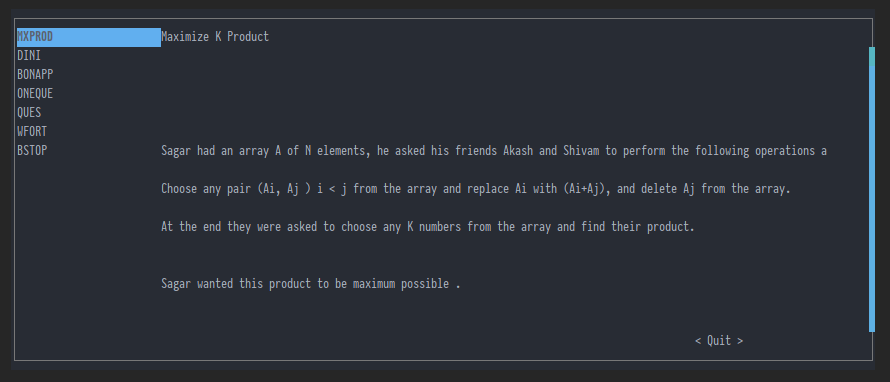
Problems of the contest presented in a nice TUI.
Rankings
rankings shows the ranklist of the selected contest.